

An RFID fob is a small keyring tag linked to your ChargeNet account. You tap it on the charger's RFID reader to start and stop sessions - no phone or app required.
Why use an RFID fob?
-
Works without mobile coverage
-
Faster to start a session at the charger
-
Useful as a backup if your phone battery is low
Why use an RFID fob?
-
Works without mobile coverage
-
Faster to start a session at the charger
-
Useful as a backup if your phone battery is low
How to order:
The fob can be ordered through your ChargeNet account:
-
Log in at ChargeNet or in the app.
-
Go to Account → RFID fob → Order fob.
Once you receive your fob, you’ll need to register it to your account with the serial number.
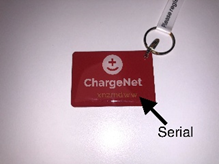
To register your RFID, log in to your ChargeNet account, select RFID fobs on the main menu, then select Register Existing or click here. Enter the code on your RFID fob and hit register. Your RFID fob will be ready to use.